> For the complete documentation index, see [llms.txt](https://medomicslab.gitbook.io/medomics-docs/llms.txt). Markdown versions of documentation pages are available by appending `.md` to page URLs; this page is available as [Markdown](https://medomicslab.gitbook.io/medomics-docs/collaboration.md).
# Collaboration
We explain here how the MEDomics platform opens the doors for collaboration.
### Scene Sharing
Within the Learning Module, users can **export a scene locally as a JSON file**. This feature allows complete machine learning workflows—represented as interactive interface configurations—to be **saved, shared, and reloaded** across different users and systems.
By exporting a scene, Momi users can capture every aspect of their experiment, including node connections, parameter settings, and pipeline configurations, in a single JSON file. This file can then be **shared with collaborators**, who can simply import it to **recreate the same experimental interface** with identical settings and structure.
### MEDMODEL Sharing
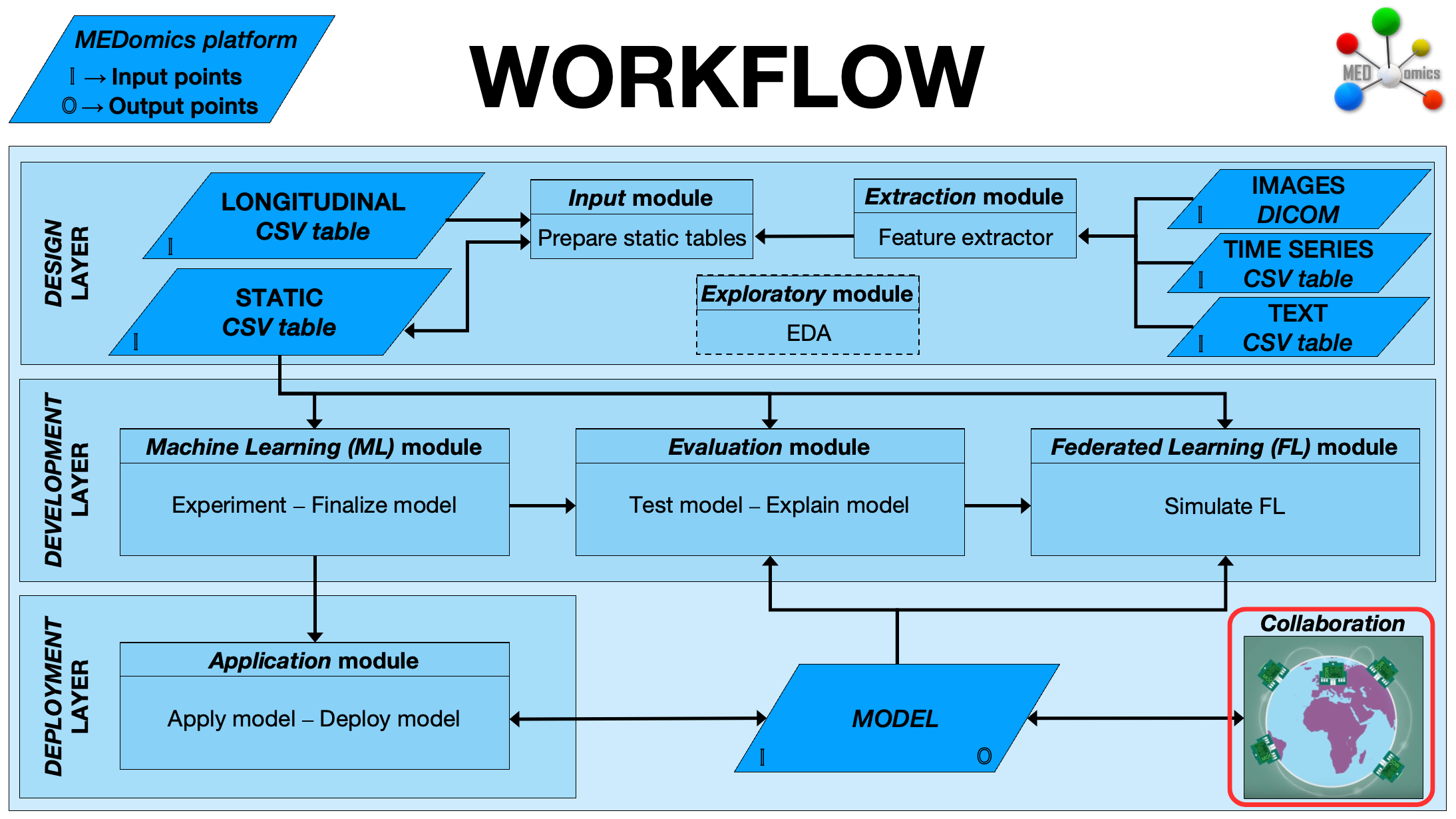
As introduced in the Learning Module, **MEDMODEL** objects represent the **final product of a machine learning experiment** within MEDomics. Each MEDMODEL encapsulates the trained model along with all relevant information about its training process, such as preprocessing steps, parameters, and performance metrics. This self-contained structure allows seamless deployment of the finalized model on new, unseen data and supports the **collaboration** phase of the workflow, as illustrated in the figure below.
The collaboration step in the MEDomics workflow
Through MEDMODEL, MEDomics users can easily **share their finalized models** across research teams and collaborators. This feature enables others to **load, test, and validate** existing models on their own datasets, while maintaining access to the complete machine learning pipeline used during training. Such functionality promotes reproducibility, transparency, and cross-institutional collaboration without the need to exchange or have access to sensitive data.
As illustrated in the figure below, you can **export** a finalized model simply by right-clicking on the `.medmodel` object and selecting **Sync**. This action saves the MEDMODEL locally as a structured folder containing two main components:
* **`metadata.json`** – Stores the model’s metadata, including variable names, data types, target column, and other essential descriptors of the experiment.
* **`model.pkl`** – A serialized (pickle) file containing the full machine learning pipeline. This includes all preprocessing steps, transformations, and the trained model itself, ensuring the model can be applied consistently to new data.
Once exported, the MEDMODEL folder can be securely shared with other MEDomics users for **testing, refinement, or integration** into new analyses. This approach allows teams to train models independently while sharing only the model artifacts, thereby overcoming challenges related to data privacy and inter-institutional data access.
---
# Agent Instructions
This documentation is published with GitBook. GitBook is the documentation platform designed so that both humans and AI agents can read, navigate, and reason over technical content effectively. Learn more at gitbook.com.
## Querying This Documentation
If you need additional information that is not directly available in this page, you can query the documentation dynamically by asking a question.
Perform an HTTP GET request on the current page URL with the `ask` query parameter, and the optional `goal` query parameter:
```
GET https://medomicslab.gitbook.io/medomics-docs/collaboration.md?ask=&goal=
```
`ask` is the immediate question: it should be specific, self-contained, and written in natural language.
`goal` is optional and describes the broader end goal you are ultimately trying to accomplish on behalf of the user. GitBook uses it to tailor the answer towards what is most useful for that goal.
The response will contain a direct answer to the question and relevant excerpts and sources from the documentation.
Use this mechanism when the answer is not explicitly present in the current page, you need clarification or additional context, or you want to retrieve related documentation sections.