# Input Module

The [Input Module](https://medomicslab.gitbook.io/medomics-docs/tutorials/design/input-module) provides multiple data processing key tools needed to fulfill various tasks within the MEDomics platform. In this proof of concept, we will use two tools from the Input Module : the *Column Tagging Tools* and the *Holdout Set Creation Tools*. We will also use the MEDomics editor to delete a column.

{% hint style="success" %}
The MEDomics Editor refers to the dedicated workspace within our platform where users can visualize datasets, track and review applied transformations, and interactively edit the data.
{% endhint %}

#### Column Deletion&#x20;

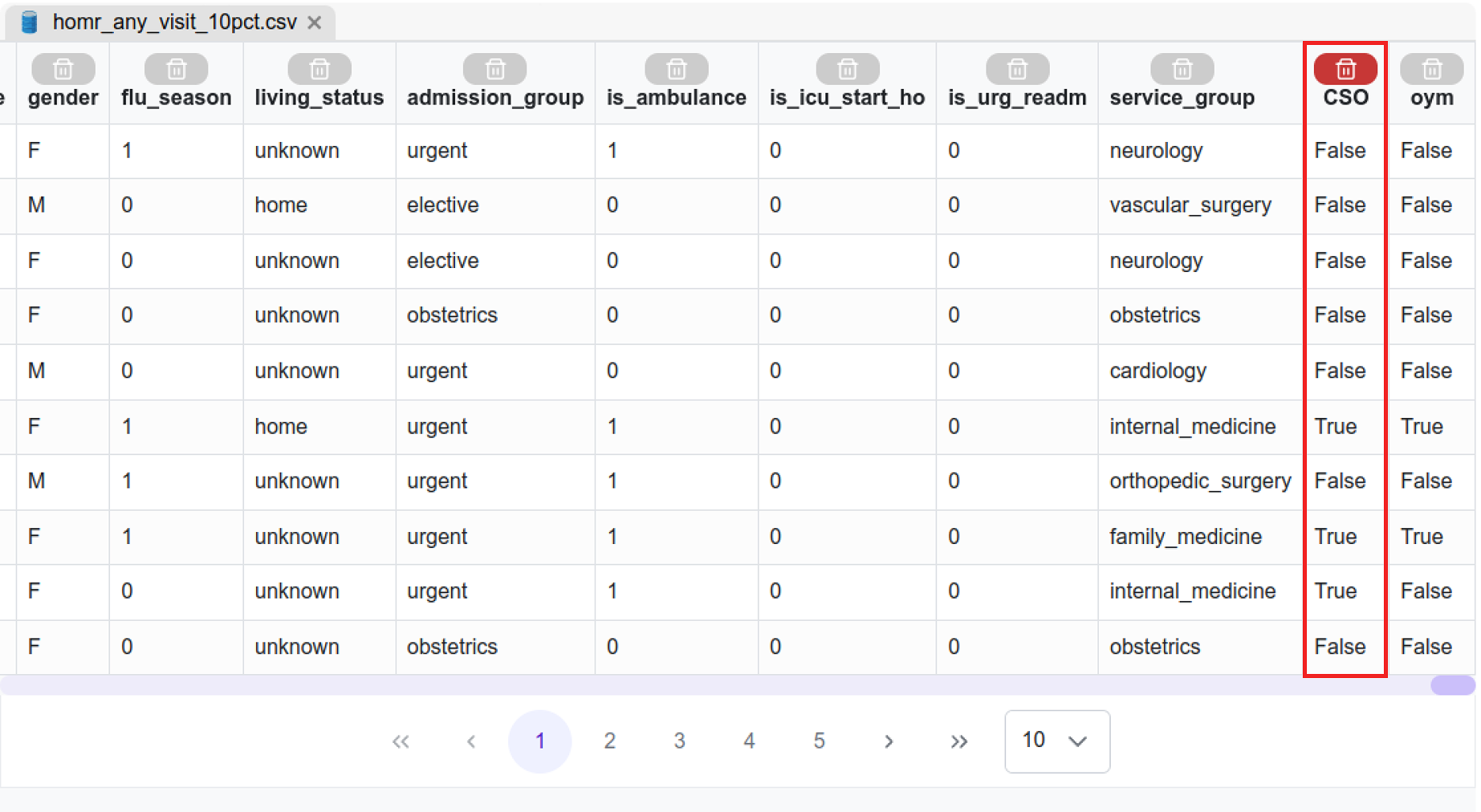
Before moving into the Input Module, we have to delete a column from our dataset file named "CSO". This column is not used in the original study and therefore we don't need to keep it.&#x20;

Double click on the `homr_any_visit_10pct.csv` file in your workspace to open it in the *MEDomics* editor. Then, click on the bin above the "CSO" column to delete it.

<figure><img src="https://4288370141-files.gitbook.io/~/files/v0/b/gitbook-x-prod.appspot.com/o/spaces%2FUO0RN9PzFLqAgLEwwaSn%2Fuploads%2Fz2MWcq20MuK6laghbvIE%2FSupprimerCSO.png?alt=media&#x26;token=9d6ca583-6f2e-4ab4-80c9-5f8169053eab" alt="" width="563"><figcaption><p>Data in <em>MEDomics</em> editor</p></figcaption></figure>

#### Column Tagging&#x20;

This [tool](https://medomicslab.gitbook.io/medomics-docs/tutorials/design/input-module#feature-or-column-tagging-tools) is a core component of the *MEDomics* platform, as it enables the use of the *MEDomics Standard* data format.

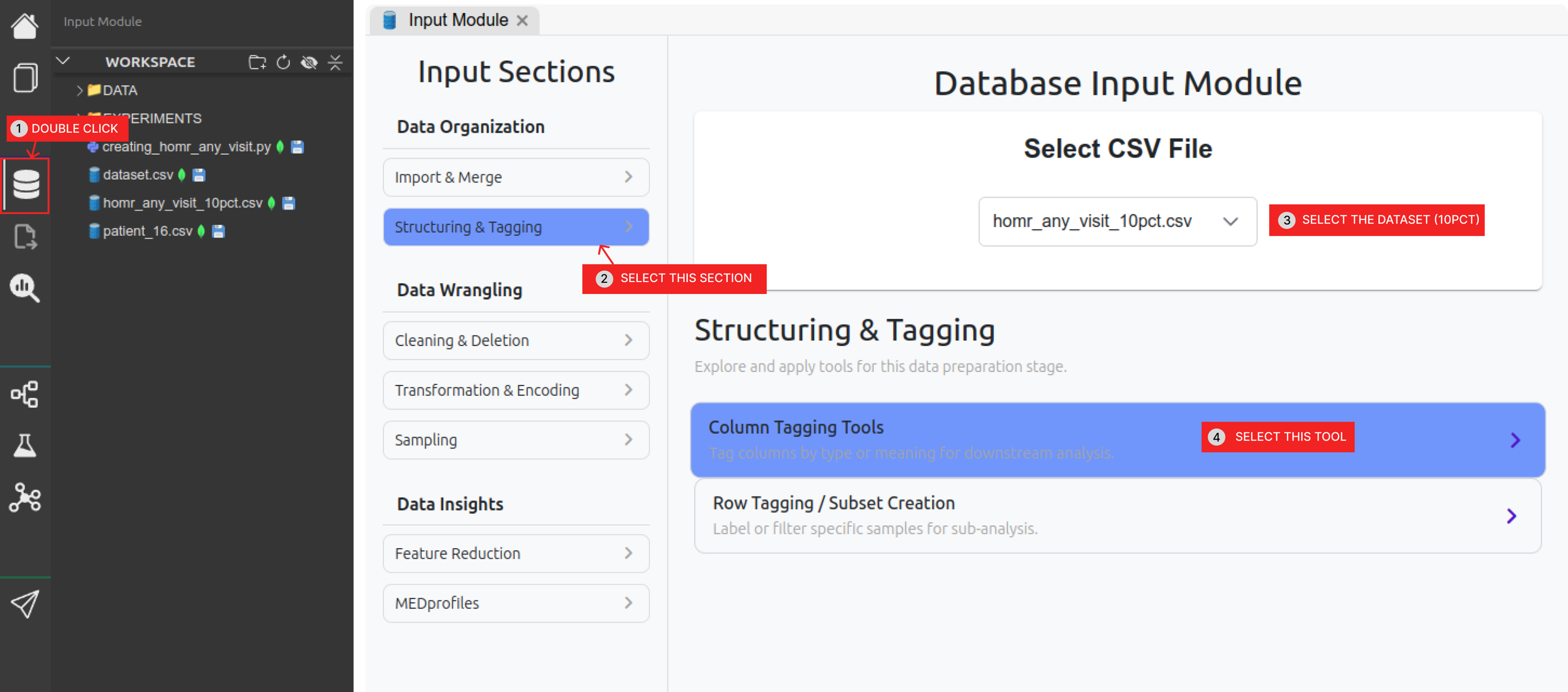
Follow the steps on the figure below to access the Column Tagging tool in the Input Module.

<figure><img src="https://4288370141-files.gitbook.io/~/files/v0/b/gitbook-x-prod.appspot.com/o/spaces%2FUO0RN9PzFLqAgLEwwaSn%2Fuploads%2FCHkqLNRhIxKNUst3J7La%2Fimage%2022.png?alt=media&#x26;token=2c31ccd1-5a95-4ad9-90a6-cc35885f5c99" alt=""><figcaption><p>Steps to the Column Tagging tools</p></figcaption></figure>

In *MEDomics*, a **tag** represents a *group of columns*. Each tag corresponds to a coherent subset of features sharing a common meaning or role (e.g., administrative data, demographic variables, clinical diagnoses). Column selection for tags is defined by the user based on data understanding and domain knowledge.

The *MEDomics Standard* format is built on this tagging mechanism. Rather than relying on a fixed dataset schema, *MEDomics* allows users to define multiple semantic views over the same dataset through tags. This design provides flexibility while preserving consistency and traceability.

<mark style="color:green;">**Dataset Structure**</mark>

The predictors in our dataset include:

* **Demographics** (age and sex at birth) – 2 variables
* **Admission characteristics** – 10 variables
* **Comorbidity diagnoses** – 85 binary variables
* **Admission diagnoses** – 147 binary variables

This results in a total of **244 predictors**.

<mark style="color:green;">**Predictor Sets in the POYM Study**</mark>

The POYM study defines two predictor sets for model training and evaluation:

* <mark style="color:$primary;">**Adm**</mark><mark style="color:yellow;">**Demo**</mark> → <mark style="color:$primary;">**Adm**</mark> (Admission characteristics) + <mark style="color:yellow;">**Demo**</mark> (Demographics)
* <mark style="color:$primary;">**Adm**</mark><mark style="color:yellow;">**Demo**</mark><mark style="color:$danger;">**Dx**</mark> → <mark style="color:$primary;">**Adm**</mark> (Admission characteristics) + <mark style="color:yellow;">**Demo**</mark> (Demographics) + <mark style="color:$danger;">**Dx**</mark> (Comorbidity diagnoses + Admission diagnoses)

For this proof of concept, we represent these predictor sets using three tags:

* <mark style="color:$primary;">**Adm**</mark> → Admission characteristics (10 variables)
* <mark style="color:yellow;">**Demo**</mark> → Demographics (2 variables: age\_original, gender)
* <mark style="color:$danger;">**Dx**</mark> → Comorbidity diagnoses (85) + Admission diagnoses (147)

To assign tags to variables:

1. Open the Input Module from the left navigation panel.
2. Under Data Organization, select Structuring & Tagging.
3. Click on Column Tagging Tools.

This tool allows you to assign the appropriate tag (`adm`, `demo`, or `dx`) to each variable according to the study definition.

<mark style="color:green;">**Variable Mapping by Tag**</mark>

<table><thead><tr><th>Tag</th><th>Description</th><th>Number of Variables</th></tr></thead><tbody><tr><td><mark style="color:$primary;"><strong>Adm</strong></mark></td><td><p>Admission characteristics : </p><p></p><ul><li><code>ed_visit_count</code></li><li><code>ho_ambulance_count</code></li><li><code>total_duration</code></li><li><code>flu_season</code></li><li><code>living_status</code></li><li><code>admission_group</code></li><li><code>is_ambulance</code></li><li><code>is_icu_start_ho</code></li><li><code>is_urg_readm</code></li><li><code>service_group</code></li></ul><p><em><mark style="color:orange;">Simply copy paste the following code line into the tagging tool:</mark></em></p><pre><code>ed_visit_count, ho_ambulance_count, total_duration, flu_season, living_status, admission_group, is_ambulance, is_icu_start_ho, is_urg_readm, service_group
</code></pre></td><td>10</td></tr><tr><td><mark style="color:yellow;"><strong>Demo</strong></mark></td><td><p>Demographics : </p><p></p><ul><li><code>age_original</code></li><li><code>gender</code></li></ul><p><em><mark style="color:orange;">Simply copy paste the following code line into the tagging tool:</mark></em></p><pre><code>age_original, gender
</code></pre></td><td>2</td></tr><tr><td><mark style="color:$danger;"><strong>Dx</strong></mark></td><td><p>Comorbidity diagnoses + Admission diagnoses (the rest of the columns)<br><em><mark style="color:orange;">Simply copy paste the following code line into the tagging tool:</mark></em></p><pre><code>dx_pneumo_adm,dx_obstructive,dx_asthma,dx_bronchiectasis,dx_chronic_resp_failure,dx_acute_resp_failure,dx_ild,dx_home_o2,dx_pseudomonas,dx_pulmonary_hypertension,dx_obesity_hypoventilation,dx_pneumonia_adm,dx_recent_pneumonia,dx_liver_1,dx_liver_2,dx_liver_rf,dx_ascites,dx_anasarca,dx_alcohol,dx_ibd_crohn,dx_recent_abdominal_pain,dx_recent_intestinal_occlusion,dx_recent_gi_bleed,dx_recent_colitis,dx_recent_perforation,dx_renal_1,dx_renal_2,dx_dialysis,dx_recent_interstitial_nephritis,dx_recent_uti,dx_dementia,dx_frailty,dx_denutrition,dx_falls,dx_cachexia,dx_paralysis,dx_cvd,dx_psych,dx_depression,dx_endo_1,dx_endo_2,dx_mi_recent,dx_mi_past,dx_angina_recent,dx_chf,dx_chf_adm,dx_cad,dx_valve,dx_aortic_stenosis,dx_a_fib,dx_recent_chest_pain,dx_pvd,dx_recent_hip_fracture,dx_recent_back_pain,dx_anticoagulation,dx_anemia,dx_recent_anemia,dx_past_pe,dx_recent_pe,dx_orl_cancer,dx_gi_cancer_1,dx_gi_cancer_2,dx_gi_cancer_3,dx_chest_cancer_1,dx_chest_cancer_2,dx_msk_cancer,dx_skin_cancer,dx_breast_cancer,dx_gu_cancer_1,dx_gu_cancer_2,dx_gu_cancer_3,dx_cns_cancer,dx_endocrine_cancer,dx_heme_cancer_1,dx_heme_cancer_2,dx_heme_cancer_3,dx_metastatic_solid_cancer,dx_cancer_ed,dx_chemo_cancer_1,dx_chemo_cancer_2,dx_palliative,dx_transplant,dx_recent_complication,dx_obstetrics,has_dx,adm_abcess,adm_abdominal_pain,adm_acute_leukemia,adm_alcohol,adm_tonsillitis,adm_anemia,adm_aneurism,adm_angina,adm_aortic_aneurism,adm_appendicitis,adm_ards,adm_arrhythmia,adm_arthropathy,adm_ascites,adm_aspiration_pneumonia,adm_asthma,adm_atrial_fibrillation,adm_bariatric,adm_benign_tumor,adm_bi_pan_cytopenia,adm_biliary_colic,adm_bladder_cancer,adm_brain_cancer,adm_brain_hemorrhage,adm_brain_injury,adm_brain_lesion,adm_breast_cancer,adm_bronchiectasis,adm_bronchitis,adm_c_difficile,adm_cancer,adm_carotid_stenosis,adm_cellulitis,adm_chemotherapy,adm_chest_pain,adm_cholangitis,adm_cholecystitis,adm_choledocholithiasis,adm_chronic_leukemia,adm_cirrhosis,adm_colorectal_cancer,adm_colitis,adm_conduction_abnormality,adm_copd,adm_delirium,adm_dementia,adm_diabetes,adm_dialysis,adm_diarrhea,adm_disk_disorder,adm_diverticular_disease,adm_dvt,adm_dysphagia,adm_dyspnea,adm_ear_disorder,adm_electrolytes,adm_endocarditis,adm_eol_care,adm_eps,adm_eye,adm_falls,adm_febrile_neutropenia,adm_fertility,adm_fracture,adm_gastric_cancer,adm_gastritis,adm_enteritis,adm_gi_bleed,adm_guillain_barre,adm_gyn_disorder,adm_heart_failure,adm_hemoptysis,adm_hepatic_failure,adm_hepatitis,adm_hip_fracture,adm_hypertension,adm_infection,adm_inguinal_hernia,adm_intestinal_ischemia,adm_intestinal_polyp,adm_intoxication,adm_joint_prosthesis,adm_liver_cancer,adm_loss_of_autonomy,adm_lower_leg_fracture,adm_lumbar_pelvis_fracture,adm_lung_cancer,adm_lung_mass,adm_lymphoma,adm_melanoma,adm_meningitis,adm_metastasis,adm_mi,adm_mii,adm_multiple_myeloma,adm_oesophageal_cancer,adm_oesophageal_varices,adm_orl_cancer,adm_osteomyelitis,adm_osteoporosis,adm_other_hernia,adm_pancreatic_cancer,adm_pancreatic_mass,adm_pancreatitis,adm_parkinsons,adm_perforation,adm_pericardial_effusion,adm_pericarditis,adm_pleural_effusion,adm_pneumonia,adm_pneumothorax,adm_pregnancy,adm_prolapsus,adm_prostate_cancer,adm_pulmonary_fibrosis,adm_pulmonary_hypertension,adm_pvd,adm_pvd_gangrene,adm_pvd_insufficiency,adm_pvd_ischemia,adm_reanimation,adm_renal_failure,adm_respiratory_failure,adm_seizures,adm_sepsis,adm_severe,adm_shock,adm_spondylopathy,adm_stroke,adm_subarachnoid_hemorrhage,adm_syncope_hypotension,adm_tachycardia,adm_tamponnade,adm_thyroid_cancer,adm_tia,adm_trauma,adm_trigeminal_neuralgia,adm_tumor,adm_urinary_lithiasis,adm_urinary_retention,adm_uro_procedure,adm_uti,adm_valve_prosthesis,adm_valve_regurgitation,adm_valve_stenosis,adm_virus,adm_weight_loss_fatiguedx_pneumo_adm,dx_obstructive,dx_asthma,dx_bronchiectasis,dx_chronic_resp_failure,dx_acute_resp_failure,dx_ild,dx_home_o2,dx_pseudomonas,dx_pulmonary_hypertension,dx_obesity_hypoventilation,dx_pneumonia_adm,dx_recent_pneumonia,dx_liver_1,dx_liver_2,dx_liver_rf,dx_ascites,dx_anasarca,dx_alcohol,dx_ibd_crohn,dx_recent_abdominal_pain,dx_recent_intestinal_occlusion,dx_recent_gi_bleed,dx_recent_colitis,dx_recent_perforation,dx_renal_1,dx_renal_2,dx_dialysis,dx_recent_interstitial_nephritis,dx_recent_uti,dx_dementia,dx_frailty,dx_denutrition,dx_falls,dx_cachexia,dx_paralysis,dx_cvd,dx_psych,dx_depression,dx_endo_1,dx_endo_2,dx_mi_recent,dx_mi_past,dx_angina_recent,dx_chf,dx_chf_adm,dx_cad,dx_valve,dx_aortic_stenosis,dx_a_fib,dx_recent_chest_pain,dx_pvd,dx_recent_hip_fracture,dx_recent_back_pain,dx_anticoagulation,dx_anemia,dx_recent_anemia,dx_past_pe,dx_recent_pe,dx_orl_cancer,dx_gi_cancer_1,dx_gi_cancer_2,dx_gi_cancer_3,dx_chest_cancer_1,dx_chest_cancer_2,dx_msk_cancer,dx_skin_cancer,dx_breast_cancer,dx_gu_cancer_1,dx_gu_cancer_2,dx_gu_cancer_3,dx_cns_cancer,dx_endocrine_cancer,dx_heme_cancer_1,dx_heme_cancer_2,dx_heme_cancer_3,dx_metastatic_solid_cancer,dx_cancer_ed,dx_chemo_cancer_1,dx_chemo_cancer_2,dx_palliative,dx_transplant,dx_recent_complication,dx_obstetrics,has_dx,adm_abcess,adm_abdominal_pain,adm_acute_leukemia,adm_alcohol,adm_tonsillitis,adm_anemia,adm_aneurism,adm_angina,adm_aortic_aneurism,adm_appendicitis,adm_ards,adm_arrhythmia,adm_arthropathy,adm_ascites,adm_aspiration_pneumonia,adm_asthma,adm_atrial_fibrillation,adm_bariatric,adm_benign_tumor,adm_bi_pan_cytopenia,adm_biliary_colic,adm_bladder_cancer,adm_brain_cancer,adm_brain_hemorrhage,adm_brain_injury,adm_brain_lesion,adm_breast_cancer,adm_bronchiectasis,adm_bronchitis,adm_c_difficile,adm_cancer,adm_carotid_stenosis,adm_cellulitis,adm_chemotherapy,adm_chest_pain,adm_cholangitis,adm_cholecystitis,adm_choledocholithiasis,adm_chronic_leukemia,adm_cirrhosis,adm_colorectal_cancer,adm_colitis,adm_conduction_abnormality,adm_copd,adm_delirium,adm_dementia,adm_diabetes,adm_dialysis,adm_diarrhea,adm_disk_disorder,adm_diverticular_disease,adm_dvt,adm_dysphagia,adm_dyspnea,adm_ear_disorder,adm_electrolytes,adm_endocarditis,adm_eol_care,adm_eps,adm_eye,adm_falls,adm_febrile_neutropenia,adm_fertility,adm_fracture,adm_gastric_cancer,adm_gastritis,adm_enteritis,adm_gi_bleed,adm_guillain_barre,adm_gyn_disorder,adm_heart_failure,adm_hemoptysis,adm_hepatic_failure,adm_hepatitis,adm_hip_fracture,adm_hypertension,adm_infection,adm_inguinal_hernia,adm_intestinal_ischemia,adm_intestinal_polyp,adm_intoxication,adm_joint_prosthesis,adm_liver_cancer,adm_loss_of_autonomy,adm_lower_leg_fracture,adm_lumbar_pelvis_fracture,adm_lung_cancer,adm_lung_mass,adm_lymphoma,adm_melanoma,adm_meningitis,adm_metastasis,adm_mi,adm_mii,adm_multiple_myeloma,adm_oesophageal_cancer,adm_oesophageal_varices,adm_orl_cancer,adm_osteomyelitis,adm_osteoporosis,adm_other_hernia,adm_pancreatic_cancer,adm_pancreatic_mass,adm_pancreatitis,adm_parkinsons,adm_perforation,adm_pericardial_effusion,adm_pericarditis,adm_pleural_effusion,adm_pneumonia,adm_pneumothorax,adm_pregnancy,adm_prolapsus,adm_prostate_cancer,adm_pulmonary_fibrosis,adm_pulmonary_hypertension,adm_pvd,adm_pvd_gangrene,adm_pvd_insufficiency,adm_pvd_ischemia,adm_reanimation,adm_renal_failure,adm_respiratory_failure,adm_seizures,adm_sepsis,adm_severe,adm_shock,adm_spondylopathy,adm_stroke,adm_subarachnoid_hemorrhage,adm_syncope_hypotension,adm_tachycardia,adm_tamponnade,adm_thyroid_cancer,adm_tia,adm_trauma,adm_trigeminal_neuralgia,adm_tumor,adm_urinary_lithiasis,adm_urinary_retention,adm_uro_procedure,adm_uti,adm_valve_prosthesis,adm_valve_regurgitation,adm_valve_stenosis,adm_virus,adm_weight_loss_fatigue
</code></pre></td><td>232</td></tr></tbody></table>

{% hint style="warning" %}
The columns "patient\_id", "visit\_id" and "oym" should not be assigned to any tag.&#x20;
{% endhint %}

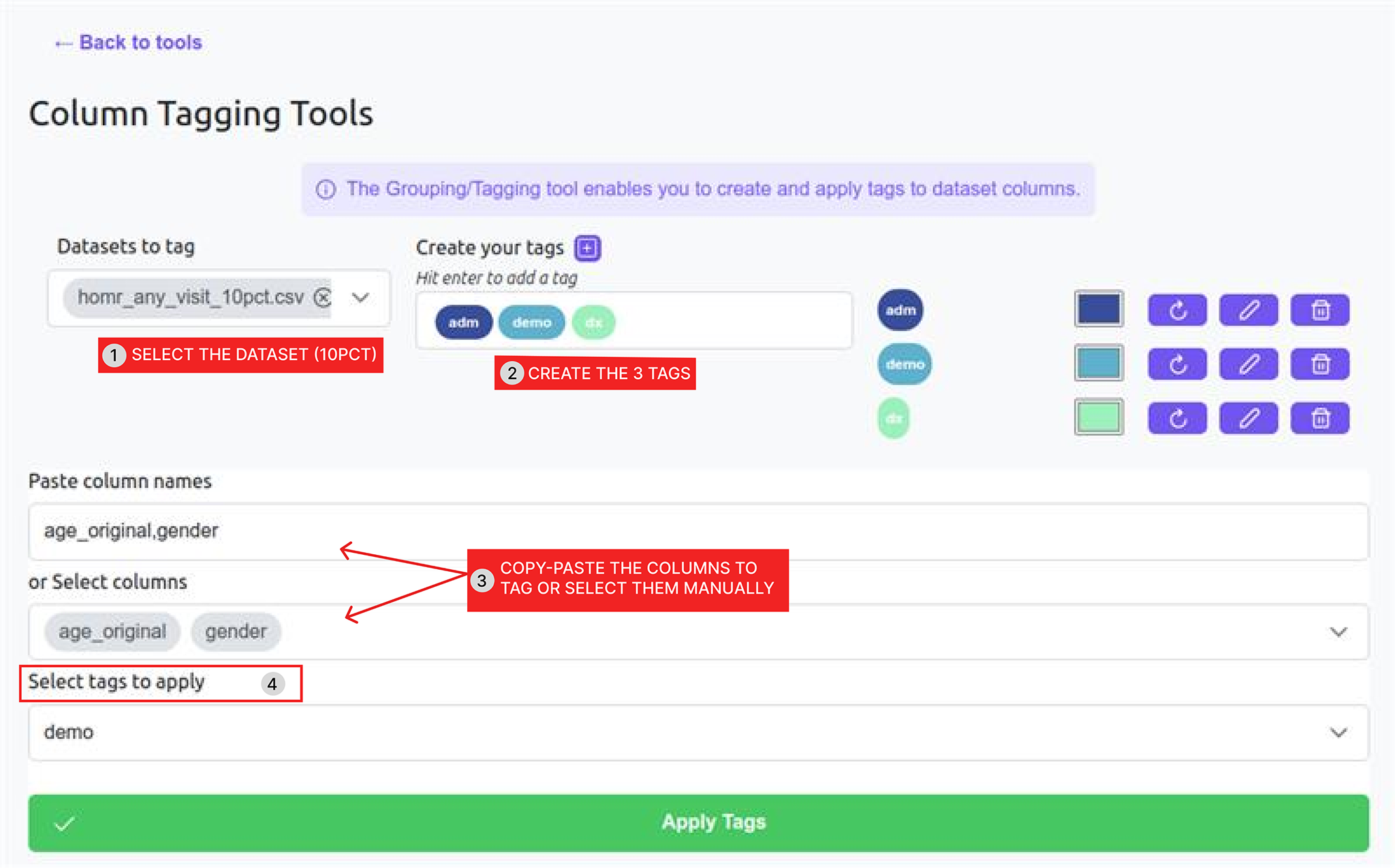
The figure below illustrates the process of assigning tags to dataset columns using the Column Tagging Tools.

1. Select the dataset (`homr_any_visit_10pct.csv`).
2. Create the three required tags: `adm`, `demo`, and `dx` by entering their names one after the other and hitting enter.
3. Copy-paste the column names corresponding to each table from the table above.
4. Choose the appropriate tag to apply.
5. Click **Apply tags** to validate the configuration.

{% hint style="info" %}
The third step presents two alternative ways to assign columns to their corresponding tags.

This can be done either by:

* Pasting the column names manually, or
* Selecting the columns directly from the displayed dataset.
  {% endhint %}

In this example, the variables `age_original` and `gender` are assigned to the `demo` tag.

<figure><img src="https://4288370141-files.gitbook.io/~/files/v0/b/gitbook-x-prod.appspot.com/o/spaces%2FUO0RN9PzFLqAgLEwwaSn%2Fuploads%2F7yqrgZAoNi4f1hGGnm8M%2Fimage%2030.png?alt=media&#x26;token=a53ffe6f-0bdb-478d-978f-73ea987f611c" alt=""><figcaption><p>Create the "adm", "demo" and "dx" tags</p></figcaption></figure>

You can visualize the tags within the dataset in the *MEDomics* editor.

{% hint style="warning" %}
If the dataset is already open in the MEDomics Editor, please close it and reopen it to update the view and ensure that the newly assigned tags are properly displayed.
{% endhint %}

#### Holdout set creation

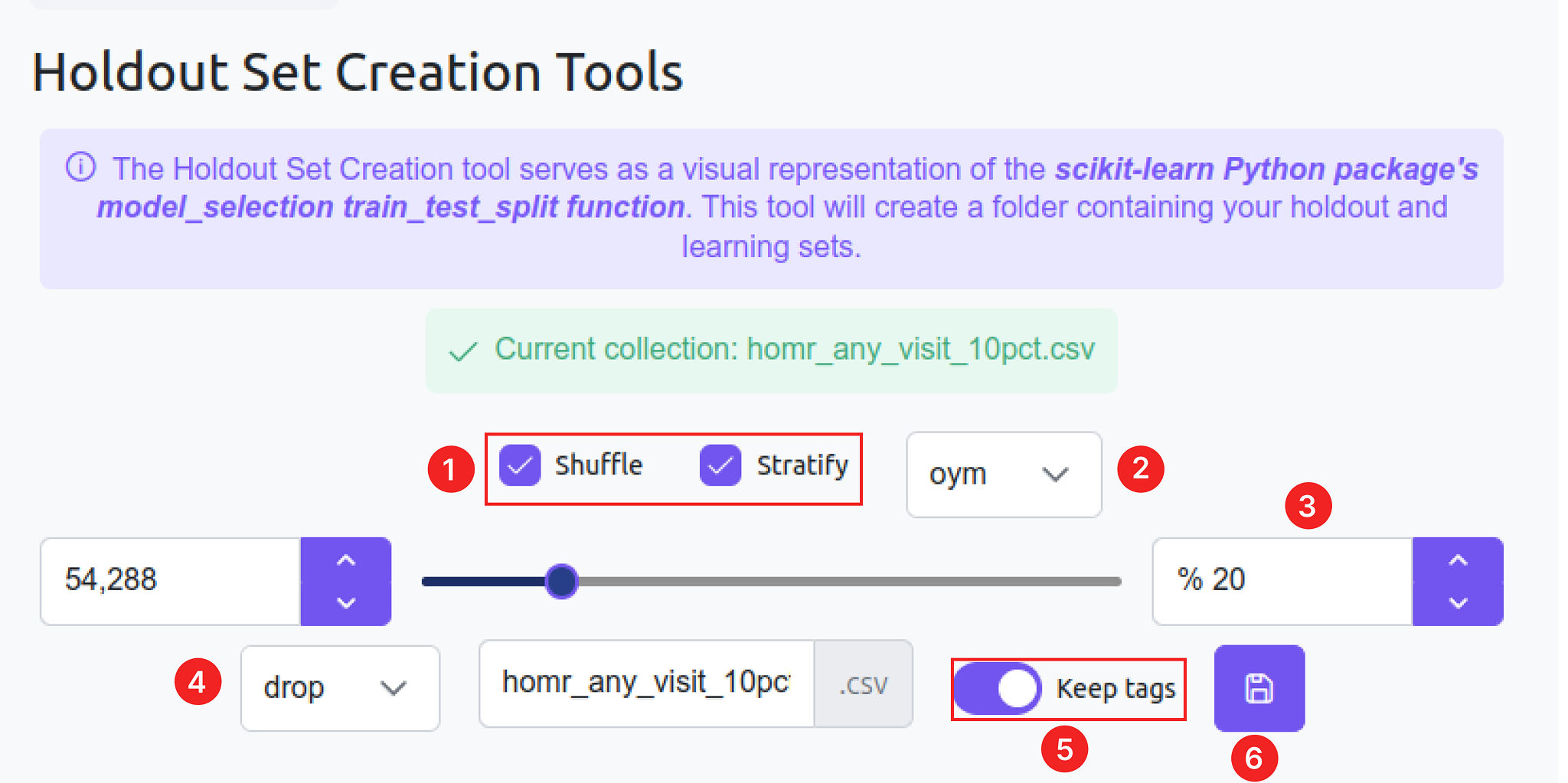
After creating our tags, the final step is to split our data into a learning set and a holdout set.&#x20;

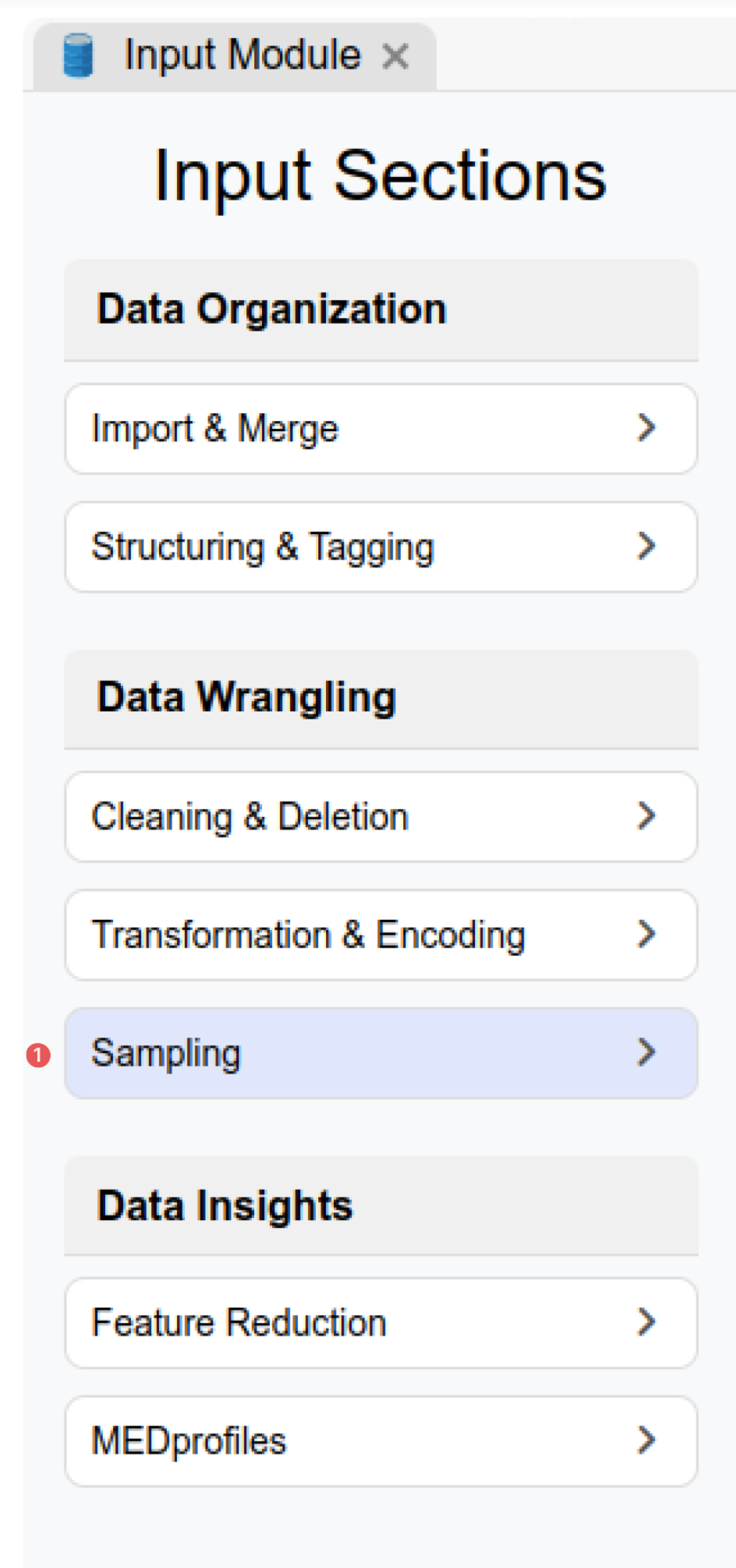
For this task, we will use the *Holdout Set Creation Tools*. To access this [tool](https://medomicslab.gitbook.io/medomics-docs/tutorials/design/input-module#holdout-set-creation-tool), select *Sampling* under the *Data Wrangling* section in the *Input Module*.&#x20;

<figure><img src="https://4288370141-files.gitbook.io/~/files/v0/b/gitbook-x-prod.appspot.com/o/spaces%2FUO0RN9PzFLqAgLEwwaSn%2Fuploads%2FhxBj54BwaeMZ6uccTERe%2Fimage%2024.png?alt=media&#x26;token=6cc655ec-263a-4e6a-b930-e818d0d6b96e" alt="" width="188"><figcaption><p>Sampling in the Data Wrangling section</p></figcaption></figure>

After selecting the dataset (`homr_any_visit_10pct.csv`):

1. Enable **Shuffle** and **Stratify**.
2. Select **`oym`** as the target column.
3. Set the split percentage to **20%**.
4. Choose **"drop"** as the empty cells cleaning method.
5. Activate the **Keep tags** toggle.
6. Click the **Save** icon to create the Learning and Holdout sets.

These steps are illustrated in the figure below.

<figure><img src="https://4288370141-files.gitbook.io/~/files/v0/b/gitbook-x-prod.appspot.com/o/spaces%2FUO0RN9PzFLqAgLEwwaSn%2Fuploads%2FPKEnFxkPL9UE3XLfv00Q%2Fimage%2025.png?alt=media&#x26;token=e59b91fd-f10b-401e-90c5-58d4a4afe8b2" alt="" width="563"><figcaption><p>Create Learning and Holdout sets from our dataset</p></figcaption></figure>

{% hint style="success" %}
This will create two new CSV datasets: `Holdout_homr_any_visit_10pct.csv` and `Learning_homr_any_visit_10pct.csv`.&#x20;
{% endhint %}

With the creation of the Holdout and the Learning sets, we conclude our Input Module steps, and we can now start the machine learning phase.

> This step ensures that the dataset is properly prepared for the demo and ready to be used in a complete end-to-end workflow within *MEDomics*, including the **Learning**, **Evaluation** and **Application** modules. In the next section, we will use `homr_any_visit_10pct.csv` dataset (with the applied tags preserved, of course!) to run machine learning experiments and replicate the POYM study.&#x20;

This concludes our *Input Module* section. Now our data is ready for model training!